


Planter - Garden Planner
4.51.24K Reviews
App Specs
- Version
- 3.6.44
- Updated On
- License
- Free
- Downloads
- 500,000+
- Developer
- Planter
- Categories
- Lifestyle
- Platform
- Android
Screenshots
 Analysis by AppCompare
I like gardening most when it feels calm and hands-on, but planning a growing space can quickly turn into a tangle of decisions: what to plant, where it will fit, and how to remember what I tried last season. A digital garden planner is useful when it helps me sort out those choices before I start digging. Planter - Garden Planner is aimed at that practical part of the hobby, especially for people growing vegetables who want a visual way to think through a plot.
Where a garden plan saves time
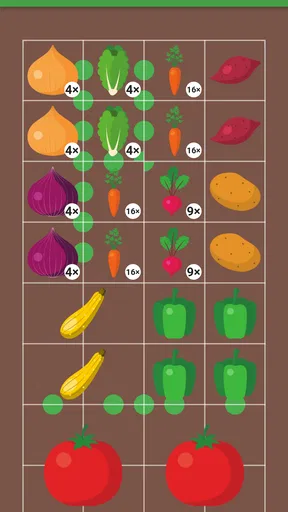
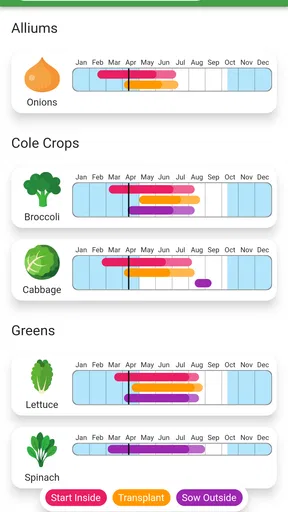
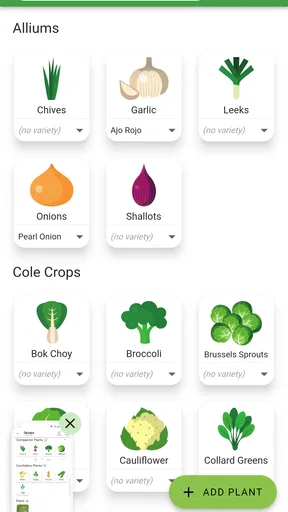
The app makes the most sense before planting day. I can use a garden grid to sketch out beds, consider how much room each crop needs, and keep a record of the arrangement rather than relying on a rough mental picture. That is particularly handy when a small bed has to serve several purposes: a row of familiar vegetables, a few new experiments, and enough space to reach everything without trampling neighboring plants.
A useful habit is to plan around the space I can actually tend, not the space I wish I had. Mapping a balcony container or a compact raised bed first can make it easier to notice when I am trying to squeeze in too many crops. I would also treat the plan as a working draft. A layout that looks balanced on a screen may need adjusting for shade, access to water, or the way a path cuts across the garden.
Network moments and mobile use
Garden planning often happens in two very different places: indoors, while I am researching what to grow, and outside, where I need to check a decision with soil and sunlight in front of me. The app’s planning and reference approach suits that back-and-forth, but I would prepare important notes and layouts before heading to a spot where my connection may be unreliable. I would not make a critical planting-day workflow depend on being able to load information at the last moment.
For a realistic routine, I might plan a vegetable bed at the kitchen table, then take a quick look at the layout outside while measuring the available space. If something does not fit, I can revise the idea before buying or planting. On a phone, that is more convenient than carrying a notebook and trying to decipher a sketch later, although a larger screen can be more comfortable when arranging a detailed grid.
Connectivity matters most when I am looking up guidance or trying to use any community-facing material. A weak signal can interrupt browsing at precisely the moment I want an answer, so I would avoid leaving research until I am already standing in the garden with tools in hand. The practical workaround is simple: make a short list of questions beforehand, check what I need while connected, and keep the actual planting plan clear enough to follow without repeatedly searching.
Making notes useful over a whole season
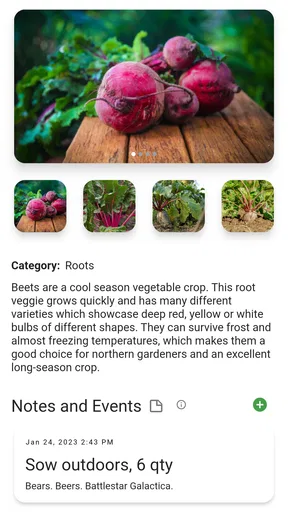
One of the less obvious benefits of a garden planner is that it can help turn vague memories into useful comparisons. If I note what I planted in a particular section and what I observed, I have something more reliable than “that corner did well last year.” I can record when a crop struggled, whether a placement seemed too shaded, or which arrangement was inconvenient to reach. Those observations make the next plan more informed, even if the app cannot replace what I see in the garden.
Worth Reading Before You Choose

EA SPORTS FC Mobile 26 Is a Bigger Football Game, but It Takes Time

Flipboard Shows What News Apps Must Do Beyond the Feed

Switching to Android Auto Means Rethinking Your Driving Routine

Google Calendar Makes a Crowded Week Easier to Manage

Ludo King Makes the Most of the Minutes Between Plans

Baby Panda World Brings Quick Play to Modern Phones, but Its Game Library Feels Busy
I would keep notes brief and specific. “The leaves looked poor” is hard to act on later; “this spot stayed shaded after lunch” points to a decision I can test next season. Likewise, tracking every small detail can become a chore. I would prioritize notes that could change what I plant or where I place it, rather than turning a relaxing hobby into paperwork.
When plans change, I would update the layout instead of treating it as a perfect record of reality. A seed may fail, a plant may outgrow its allotted space, or weather may force a change. That is not a flaw in the plan; it is a reason to use it as a reference for decisions. Keeping the intended arrangement distinct from what actually happened can make end-of-season reflections more honest and useful.
Who will get the most from it
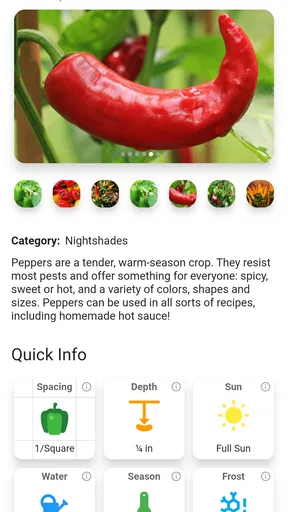
I can see this being especially helpful for a beginner who wants a gentle structure for choosing and arranging vegetables, or for someone who has a few beds and keeps forgetting what went where. The grid gives a visual starting point, while plant information and companion-planting guidance can prompt questions that are easy to overlook when choosing crops one by one.
It is less compelling for someone who already has a settled garden routine and prefers a paper journal, a spreadsheet, or a simple calendar. Those options can be faster for recording observations if the main need is not spatial planning. It may also frustrate a gardener who expects a planner to make local growing decisions automatically. A general plant guide can inform a choice, but it cannot know the exact light, soil, drainage, or microclimate in a particular yard.
The best approach is to use the app for organization, then check its suggestions against the conditions I can observe. Companion planting is a helpful planning lens, not a guarantee that two crops will thrive together in every bed. I would leave room for access and airflow rather than filling every square just because the grid allows it.
Using Planter through the growing season
I use a garden plan differently as the season moves along: early on, it helps me decide what could fit, while later it becomes a record I can compare with what actually grew. In this section, I focus on keeping that plan useful without letting it become a chore. A few deliberate updates can make next season’s choices clearer.
Features That Make You Go "Wow!"
So, what makes this app stand out from the rest? For starters, the plant database is pretty extensive. You can search for plants by name, type, or even the kind of conditions they thrive in. This is where the magic happens: you can drag and drop different plants into your grid, and the app will tell you if they’re a good match. It’s like being on a plant dating show!
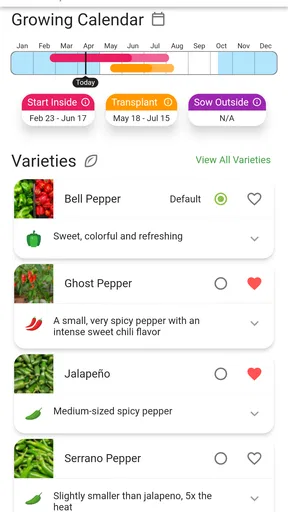
And let's not forget the notifications. Who doesn't love a good reminder? The app will nudge you when it’s time to water your plants or apply fertilizer. It’s literally like having a personal assistant for your garden. You can customize these reminders to suit your schedule, which is super handy if you’re juggling multiple responsibilities.
Reminders work best when I set them as prompts to check, not unquestionable instructions. Watering needs change with conditions, and a notification cannot feel the soil or account for recent rain. I would use a nudge to remember to inspect a bed, then decide what it needs. That small distinction keeps a digital schedule from encouraging unnecessary watering or feeding.
Customizing Your Garden
What I really love is the customization feature. You can specify the size of your garden, whether it’s a sprawling backyard or a cozy balcony. The app accommodates all sizes and scales seamlessly. You can also add notes for each section, which is great for keeping track of your gardening experiments or ideas.
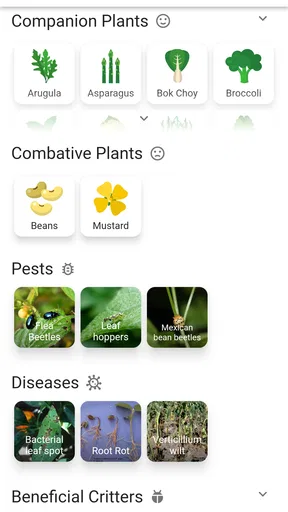
Another cool feature is the companion planting guide. Ever wonder if your tomatoes and basil should hang out together? The app provides insights into which plants benefit each other, helping you create a harmonious and productive garden.
For a balcony grower, size customization is more than a cosmetic detail: it helps make the plan correspond to the containers and floor space available. I would still account for practical constraints that a neat grid can hide, such as whether I can reach the back of a pot or move around a narrow balcony. For a larger plot, I would divide the drawing into sections that match the way I work, rather than trying to manage every crop as one giant arrangement.
Learning and Growing
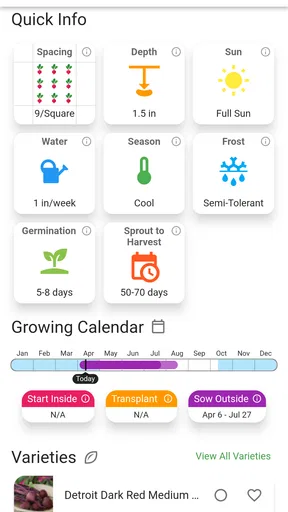
If you're a newbie, fear not! The app has a treasure trove of gardening tips. From soil preparation to pest management, Planter offers advice that’s both practical and easy to understand. They’ve even got a forum where you can connect with other gardeners. So, if you’re feeling stuck, you can ask for help or share your success stories.
For those who are more seasoned, the app still offers plenty of value. I mean, who doesn’t like to geek out over plant growth data? You can track your plants' progress over time and analyze what’s working and what’s not. It's like having a mini lab in your pocket.
When I use advice from a community or general gardening guide, I would treat it as a starting point rather than a local prescription. Gardeners can have different climates and growing conditions, so a tip that works for one person may not transfer neatly to another. The most useful exchange is often a specific question with context: what I planted, where it is growing, and what I observed. That also makes my own notes more valuable when I revisit the plan.
Checking the practical details
Planter is a free lifestyle app from Planter, with optional in-app purchases listed from $0.99 to $99.99 per item. Its broad appeal is reflected in an average rating of 4.6 from around 4,000 ratings, and it has been installed over 500,000 times. It is rated for Everyone, so the subject and general audience are accessible to all ages. The app first appeared on March 19, 2017, and version 3.6.44 is the current release; Android users need version 7.0 or later.
I would start with the free experience and decide whether any optional purchase addresses a need I actually have. A garden planner is most useful when I keep returning to it, not when I buy extra access before knowing whether its layout and reference material fit my habits. On the technical side, checking that an older Android device meets the minimum operating-system requirement is a sensible first step before building a season’s plan.
For dependable use, I would also make a simple recovery routine part of gardening rather than assuming every detail will always be at hand. Keep especially important measurements or seasonal observations somewhere you can consult if your phone is unavailable, and avoid relying on a single reminder for a time-sensitive task. This is not a knock against the app; it is a practical safeguard for any digital tool used outdoors, where a low battery, poor reception, or muddy hands can change the moment.
Final Thoughts
Honestly, I think Planter - Garden Planner is a must-have for anyone who loves plants, whether you’re just starting out or have a garden that could rival a botanical garden. It’s user-friendly, informative, and incredibly handy. Plus, having all your garden data in one spot makes life so much easier. So, what are you waiting for? Get your hands dirty and let this app guide you to a greener thumb.
Whether you're planning a vegetable garden or just want to keep your indoor plants happy, this app has got you covered. So go ahead, download it, and watch your garden dreams come to life!
My connectivity verdict
I would choose this app when visual organization, crop selection, and season-to-season notes are more important than having a bare-bones checklist. Compared with a paper calendar, it brings the layout and plant references closer together; compared with a general notes app, it gives the garden plan a spatial shape. A notebook or spreadsheet may still be better for someone who wants complete control over a custom record or prefers not to use a phone while gardening.
For me, connectivity is a consideration rather than the reason to use or avoid it. I would do research and make substantial edits while I have a reliable connection, then use the plan as a guide outdoors and keep essential observations easy to recover. If I want a tool that works entirely as an offline field notebook, I would choose an option whose offline behavior is clearly established instead. If I want help organizing a vegetable garden and am comfortable planning ahead, Planter - Garden Planner is a friendly, practical companion that can make the growing season feel more deliberate without pretending to replace a gardener’s judgment.
Pros
- User-friendly interface for easy navigation
- Comprehensive plant library with detailed info
- Customizable garden layout options
- Offline mode for planning without internet
- Frequent updates with new features
Cons
- Limited free version features
- Occasional app crashes reported
- Requires in-app purchases for full access
- Some plant data may be outdated
- Lacks integration with other gardening apps
FAQs for Planter - Garden Planner
What features does Planter - Garden Planner offer?
Planter - Garden Planner provides a comprehensive suite of features including plant tracking, garden layout planning, and pest management tips. The app allows users to visualize their garden space, track plant growth, and receive notifications for watering and fertilizing schedules. It's designed to assist both novice and experienced gardeners.
Is Planter - Garden Planner suitable for beginners?
Yes, Planter - Garden Planner is ideal for beginners. It offers an intuitive interface with easy-to-follow instructions for setting up and maintaining a garden. The app includes a plant library with detailed information, making it easy for new gardeners to select and care for the right plants.
Can I customize my garden layout with Planter?
Absolutely! Planter - Garden Planner allows users to customize their garden layout to fit their specific space and preferences. You can drag and drop plants, rearrange them, and even plan different types of garden beds. This feature helps users visualize their garden before planting.
Does Planter provide information on local growing conditions?
Yes, Planter - Garden Planner provides localized growing information, including climate and soil recommendations. The app tailors advice based on your location, ensuring that users receive relevant tips for optimal plant growth. This feature is particularly useful for adapting your garden to local conditions.
How does Planter help with pest management?
Planter - Garden Planner includes a pest management feature that helps identify common garden pests and offers solutions for dealing with them. The app provides organic and chemical treatment options, allowing users to choose the best approach for their garden. This feature is essential for maintaining plant health.


